The Source Diagram🔗
The diagram below, and the added QR code, are key information sources for this document and its underlying Knowledge Graph.
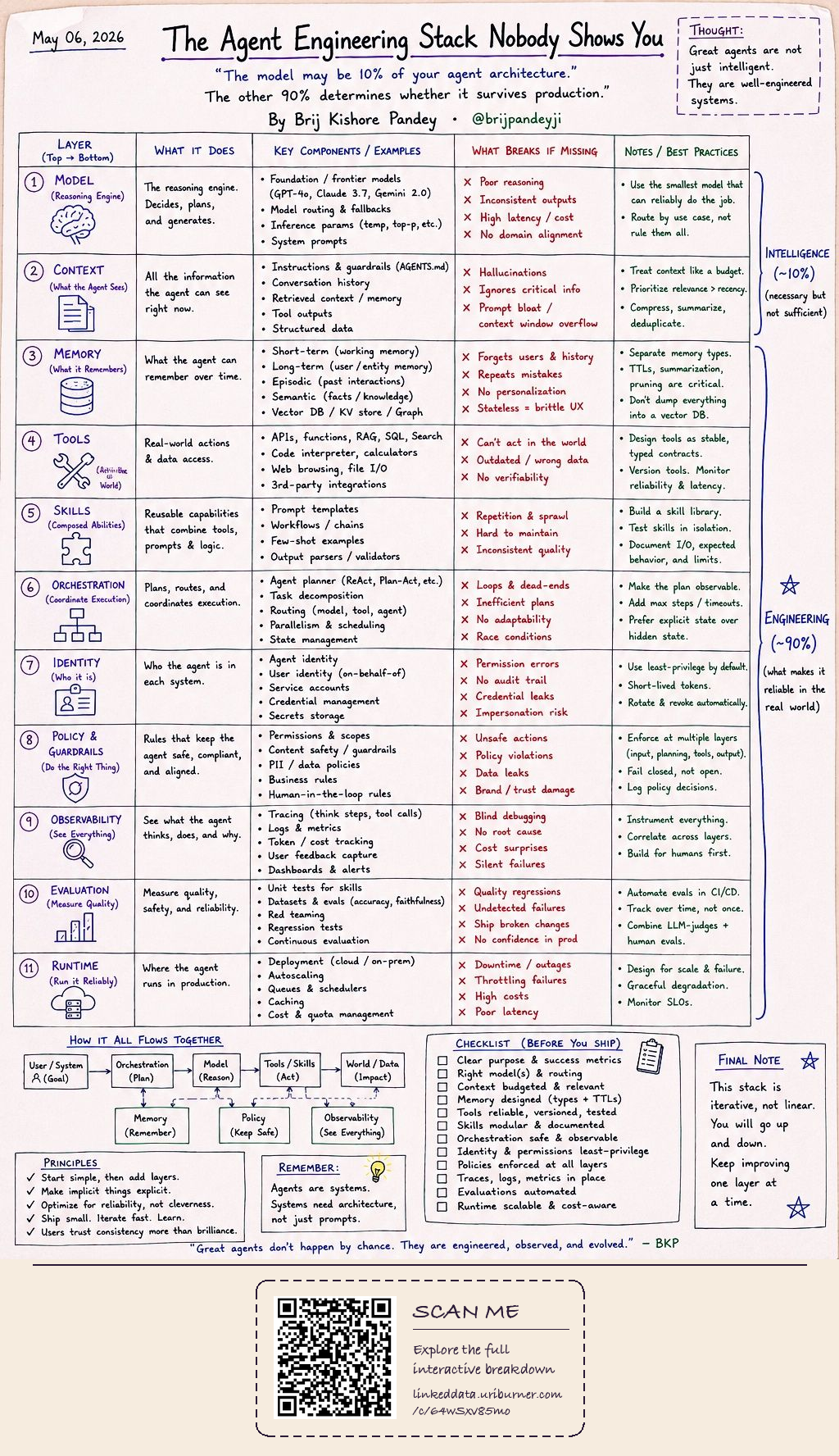
11 Layers, Scored Against a Real Implementation🔗
Each layer of the stack is matched to the concrete files that implement it, with links checked against the GitHub Git Trees API before publication.
Not implemented here — the reasoning engine (Claude, GPT, DeepSeek, GLM, etc.) is external. The repo instead identifies the active model and routes to it.
Ontology-routed context selection: prompt-intent classes select which topics, howtos, and sessions get loaded into the live context window — a relevance budget, not a full dump.
This is the repo's core purpose. Episodic memory in sessions/, semantic memory in entities/, and long-term behavioral memory in preferences.ttl — governed by a 16-step sub-HowTo.
Provides validation/utility scripts and a SPARQL bootstrap loader; the broader tool/API surface (curl, MCP) belongs to the host harness rather than this repo.
The howto/ folder is a skill library: 40+ reusable, independently-specified behavioral modules, each documented with I/O contracts and gates.
The mandatory 9-step retrieval protocol is the orchestration plan — list, read core, read preferences, read the private overlay, read ontology, read index, classify intent, SPARQL-route, and fall back to file reads.
core.ttl carries both agent and user identity; a dedicated 14-step sub-HowTo runs openssl certificate-modulus checks for whoami-class requests.
preferences.ttl is the policy layer — 140+ HowToSteps, many implemented as hard blocking gates that fail closed, with a public/private split enforcing the data boundary.
Session files are the trace log — dated, model-tagged, environment-tagged — but there is no dashboard/metrics layer; observability is file- and SPARQL-query-based.
A post-session audit script plus a hard Turtle-validity/sparse-text gate act as continuous evaluation — live-tested when a July 2026 preferences.ttl edit was blocked until it complied.
Defines its own SPARQL endpoint contract and an explicit graceful-degradation path, but deployment/scaling of that endpoint (Virtuoso) is outside the repo's scope.
How This Analysis Was Produced🔗
The same 9-step protocol the repo enforces on itself, applied to producing this page.
Read the repo's own documentation first
Start from README.md, core.ttl, and AGENTS.md rather than inferring structure from file names alone.
Map each stack layer to concrete files
Identify which folders and files implement each of the 11 layers, and classify coverage as Fully Implemented, Partially Covered, or Out of Scope.
Verify every link against the live repository
Fetch the full file tree via the GitHub Git Trees API and check each candidate path before embedding any URL — reject paths that don't exist, such as gitignored files.
Link only the first occurrence, inline
Scan the table's prose in row-reading order and hyperlink only the first mention of each distinct file or folder name, leaving later repeats as plain text.
Generate the RDF and HTML companions
Transform the verified content into RDF via document-to-kg-skill, then render it as this page via rdf-infographic-skill.
Frequently Asked Questions🔗
What is the "Agent Engineering Stack" this diagram maps agent-rdf-memory onto?
An 11-layer model from Brij Kishore Pandey's LinkedIn post — Model, Context, Memory, Tools, Skills, Orchestration, Identity, Policy & Guardrails, Observability, Evaluation, and Runtime — arguing the reasoning model itself is only about 10% of a production agent; the other 90% is engineering.
Which layers does agent-rdf-memory fully implement?
Context, Memory, Skills, Orchestration, Identity, Policy & Guardrails, and Evaluation — seven of the eleven layers.
Which layers are only partially covered, and why?
Tools, Observability, and Runtime. In each case the repo defines the contract or a graceful-degradation fallback, but the actual execution substrate — the host harness's tool surface, a metrics dashboard, or the Virtuoso SPARQL endpoint itself — lives outside the repository.
Why is the Model layer marked Out of Scope?
agent-rdf-memory doesn't run a reasoning engine — it identifies which LLM is active and routes behavior and output paths to it. The reasoning itself (Claude, GPT, DeepSeek, GLM, etc.) is always external.
Why does the diagram hyperlink file names inline instead of using a separate link column?
An earlier revision added a dedicated "GitHub" column of clickable chips. That was reworked after feedback: only the first mention of each real file or folder, in row-reading order, becomes an inline link; later repeats stay plain text — an enhancement to the existing prose, not new chrome bolted onto it.
How were the GitHub links verified before being embedded?
By fetching the full repository file tree from the GitHub Git Trees API (repos/OpenLinkSoftware/ai-agent-skills/git/trees/main?recursive=1) and checking every candidate path against it before writing the link — no path was guessed or assumed.
Are preferences.private.ttl and projects/ linked to GitHub?
No. Both are gitignored and confirmed absent from the public repository tree, so they are deliberately left as plain text rather than linked to a URL that would 404.
What tooling produced this HTML and RDF collection?
document-to-kg-skill transformed the diagram's content into the companion RDF-Turtle knowledge graph, and rdf-infographic-skill rendered it as this HTML page, following the same house conventions (resolver-wrapped entity hrefs, OpenLink brand palette) used across the rest of the collection.